I spent a good chunk of last week debugging why pre-commit checks passed on my machine but failed in the CI pipeline. Turned out my local tflint was version 0.50 while CI had 0.48. The formatting rules had changed between versions.
That kind of thing shouldn’t happen in 2026.
This post covers how I set up Nix Flakes and direnv to solve this problem permanently. If you’ve heard of Nix but never tried it, or tried it and bounced off, this is the practical walkthrough I wish I had.
The Actual Problem
Most infrastructure projects need a pile of tools - Terraform, tflint, shellcheck, yamlfmt, pre-commit, checkov, and so on. Without a way to manage these, everyone ends up with slightly different versions.
Alice (Windows+WSL)  →  Terraform 1.9.3, tflint 0.50
Bob (macOS)          →  Terraform 1.10.0, tflint 0.51
CI Agent (Ubuntu)    →  Terraform 1.8.5,  tflint ???
Formatting drifts. Linting rules don’t match. New developers spend half a day installing everything. Someone upgrades a tool and breaks the build for everyone else.
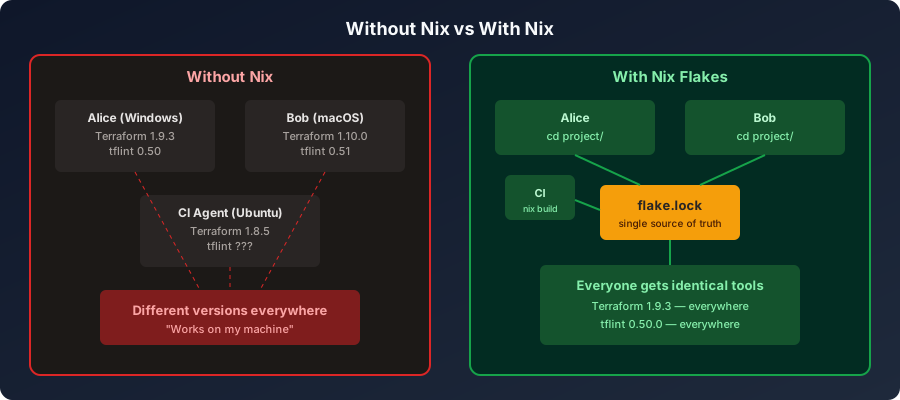
We already solved this problem for application dependencies years ago - that’s what package-lock.json and Pipfile.lock do. But for system-level tools like Terraform or shellcheck? Most teams are still winging it.
What Nix Actually Is
Nix is a package manager. Like apt or brew, but with one big difference - it’s reproducible.
When you install something with apt, it goes into /usr/bin alongside everything else. Different packages can conflict. You can’t easily have two versions of the same tool.
Nix installs every package into its own directory under /nix/store/, named by a hash of all its inputs:
/nix/store/abc123-terraform-1.9.3/bin/terraform
/nix/store/def456-tflint-0.50.0/bin/tflint
Same inputs always produce the same hash. Two versions of a tool get different hashes and coexist without conflict. Nothing touches your system directories.
What Flakes Add
A Nix Flake is just a standardised way to declare what a project needs. It’s two files:
flake.nix- what tools this project requires (the recipe)flake.lock- what exact versions to use (the receipt)
Think of flake.nix as package.json and flake.lock as package-lock.json, but for system-level binaries.
What direnv Does
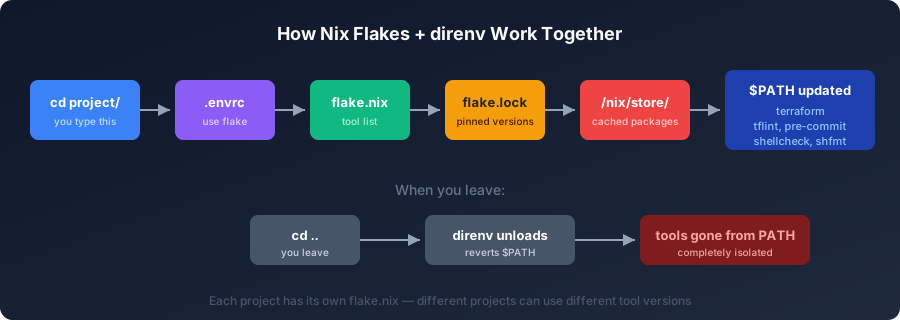
direnv is a shell hook that watches for .envrc files. When you cd into a directory that has one, it runs the commands inside. When you cd out, it reverts everything.
Combined with Nix:
cd my-project/     # direnv reads .envrc → "use flake" → Nix loads tools onto $PATH
terraform --version  # works

cd ..
terraform --version  # command not found
No manual activation. No source venv/bin/activate. Just cd.
Setting It Up From Scratch
This assumes a fresh WSL Ubuntu install. If you already have some of these, skip ahead.
Install Nix
sh <(curl -L https://nixos.org/nix/install) --no-daemon
source ~/.bashrc    # or ~/.zshrc
nix --version       # should print: nix (Nix) 2.x.x
Enable Flakes
Flakes are technically still “experimental” (they’ve been stable in practice since 2021), so you need to opt in:
mkdir -p ~/.config/nix
echo "experimental-features = nix-command flakes" >> ~/.config/nix/nix.conf
Install direnv
nix profile install nixpkgs#direnvHook it into your shell. Check which shell you’re using first:
echo $SHELLFor Zsh:
echo 'eval "$(direnv hook zsh)"' >> ~/.zshrc
source ~/.zshrc
For Bash:
echo 'eval "$(direnv hook bash)"' >> ~/.bashrc
source ~/.bashrc
That’s the one-time setup done.
Writing Your First Flake
Let’s start small. Create a project with cowsay and jq to see how things work before getting into real tooling.
mkdir ~/nix-hello && cd ~/nix-hello
git init
Nix Flakes require a Git repository. This trips people up - without git init, you’ll get an error.
Create flake.nix:
{
  description = "My first flake";
  inputs.nixpkgs.url = "nixpkgs/nixpkgs-unstable";
  inputs.flake-utils.url = "github:numtide/flake-utils";

  outputs = { nixpkgs, flake-utils, ... }:
    flake-utils.lib.eachDefaultSystem (system:
      let
        pkgs = import nixpkgs { inherit system; };
      in
      {
        devShells.default = pkgs.mkShell {
          packages = with pkgs; [ cowsay figlet jq ];
          shellHook = ''
            echo "Dev shell ready. Tools: cowsay, figlet, jq"
          '';
        };
      }
    );
}
Create .envrc:
echo "use flake" > .envrcTrack the files and allow direnv:
git add flake.nix .envrc
direnv allow
The first time, Nix downloads the packages. This takes a few minutes. After that, it’s cached and near-instant.
Once it finishes:
cowsay "it works"
echo '{"name":"nix"}' | jq .name
Now leave and come back:
cd ..
cowsay "test"        # command not found
cd ~/nix-hello
cowsay "back again"  # works
That’s the core idea. Tools appear when you enter the project and disappear when you leave.
A Real Infrastructure Flake
Here’s what a flake.nix looks like for an actual Terraform project:
{
  description = "Infrastructure project";
  inputs.nixpkgs.url = "nixpkgs/nixpkgs-unstable";
  inputs.flake-utils.url = "github:numtide/flake-utils";

  outputs = { nixpkgs, flake-utils, ... }:
    flake-utils.lib.eachDefaultSystem (system:
      let
        pkgs = import nixpkgs {
          inherit system;
          config.allowUnfreePredicate = pkg:
            builtins.elem (nixpkgs.lib.getName pkg) [ "terraform" ];
        };

        preCommitPackages = with pkgs; [
          checkov
          jq
          pre-commit
          shellcheck
          shfmt
          terraform
          terraform-docs
          tflint
          yamlfmt
          yamllint
        ];

        devPackages = with pkgs; [
          azure-cli
          kubectl
          kubelogin
          terraform-ls
        ];
      in
      {
        devShells.default = pkgs.mkShell {
          packages = nixpkgs.lib.concatLists [
            devPackages
            preCommitPackages
          ];
        };

        packages.precommit_env = pkgs.buildEnv {
          name = "preCommit";
          paths = preCommitPackages;
        };
      }
    );
}
A couple of things worth noting here.
The allowUnfreePredicate
Terraform has a BSL license, which Nix considers “unfree”. Without this line, Nix refuses to install it. You’re explicitly saying “yes, I know, install it anyway.”
Two Outputs
The flake defines two things:
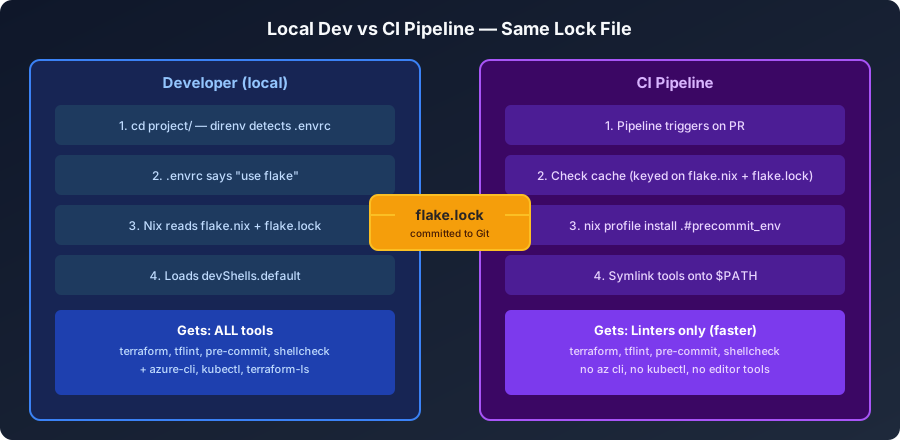
devShells.default - what developers get locally. Includes everything: pre-commit tools plus azure-cli, kubectl, terraform-ls (the language server for editor autocomplete). This is what nix develop and direnv use.
packages.precommit_env - what CI gets. Only the linting tools. CI doesn’t need azure-cli or an editor language server. Keeping this small makes pipeline runs faster.
Both read from the same flake.lock, so the Terraform version is identical everywhere.
The Lock File
When you run nix flake lock or nix flake update, Nix generates flake.lock. It pins nixpkgs to an exact Git commit:
{
  "nixpkgs": {
    "locked": {
      "rev": "d74de548348c46cf25cb1fcc4b74f38103a4590d",
      "lastModified": 1755082269
    }
  }
}
That commit determines every tool version. Terraform 1.9.3, tflint 0.50.0, yamlfmt 0.13.0 - all derived from that one commit hash.
You commit flake.lock to Git. Everyone who clones the repo and runs nix develop gets the same versions.
To update:
nix flake update       # bumps to latest nixpkgs
git diff flake.lock    # see what changed
git add flake.lock
git commit -m "chore: update tool versions"
The version change shows up in the PR. The team reviews it. If something breaks, git revert gets you back.
How CI Uses This
Here’s how you’d wire this into an Azure DevOps pipeline. The idea is simple: install Nix on the agent, restore /nix/store from cache, and run the same pre-commit checks you run locally.
# azure-pipelines.yml
trigger:
  branches:
    include: [main]

pool:
  vmImage: ubuntu-latest

steps:
  # Cache the Nix store so subsequent runs are fast
  - task: Cache@2
    inputs:
      key: 'nix-store | "precommit_env" | flake.nix, flake.lock'
      path: /nix
      restoreKeys: |
        nix-store | "precommit_env"
    displayName: Cache Nix store

  # Install Nix (skipped if cache restored the full store)
  - script: |
      if ! command -v nix &> /dev/null; then
        sh <(curl -L https://nixos.org/nix/install) --no-daemon
      fi
      echo "##vso[task.prependpath]/nix/var/nix/profiles/default/bin"
      echo "##vso[task.prependpath]$HOME/.nix-profile/bin"
    displayName: Install Nix

  # Enable flakes and install the precommit_env package
  - script: |
      mkdir -p ~/.config/nix
      echo "experimental-features = nix-command flakes" >> ~/.config/nix/nix.conf
      nix profile install .#precommit_env
    displayName: Install tools from flake

  # Run pre-commit on changed files
  - script: |
      pre-commit run --from-ref origin/main --to-ref HEAD
    displayName: Run pre-commit checks
What’s happening here:
- Cache - keyed on
flake.nix+flake.lock, so it busts when you update tool versions - Install Nix - only if the cache didn’t already provide it
- Install from flake -
nix profile install .#precommit_envreads yourflake.lockand installs the exact pinned versions - Run pre-commit - same command you run locally
The key part: it reads the same flake.lock as your local setup. Same tools, same versions. What passes locally passes in CI.
Pre-Commit Integration
Pre-commit hooks are the practical payoff. With all tools provided by Nix, your .pre-commit-config.yaml can reference system tools and they’ll just work:
repos:
  - repo: https://github.com/pre-commit/pre-commit-hooks
    rev: v6.0.0
    hooks:
      - id: trailing-whitespace
      - id: end-of-file-fixer
      - id: check-merge-conflict

  - repo: https://github.com/antonbabenko/pre-commit-terraform
    rev: v1.100.0
    hooks:
      - id: terraform_fmt
      - id: terraform_tflint
      - id: terraform_validate

  - repo: local
    hooks:
      - id: shellcheck
        entry: shellcheck
        language: system
        types: [shell]
The language: system hooks work because Nix put shellcheck, shfmt, and friends on your $PATH when you entered the project.
Run them locally:
pre-commit run --all-filesOr the same way CI does - only on files changed since main:
SKIP=terraform-docs-go,generate-terraform-graph \
  pre-commit run --from-ref origin/main --to-ref HEAD
If a hook fails on commit, you fix it before it ever reaches the remote. No more “pre-commit failed in CI” surprises.
Day-to-Day Workflow
Once everything is set up, this is what working on a project looks like:
cd my-infra-project/              # direnv activates, tools on PATH

vim deploy/terraform/resources.tf  # edit some Terraform
terraform plan -var-file=vars/dev.tfvars  # test the change

git add .
git commit -m "feat: add storage account"
# trailing-whitespace ... passed
# terraform_fmt ........ passed
# terraform_validate ... passed
# shellcheck ........... passed

git push origin feature/my-branch  # CI runs the exact same checks
When a new developer joins:
# One-time setup (5 minutes)
sh <(curl -L https://nixos.org/nix/install) --no-daemon
mkdir -p ~/.config/nix
echo "experimental-features = nix-command flakes" >> ~/.config/nix/nix.conf
nix profile install nixpkgs#direnv
echo 'eval "$(direnv hook zsh)"' >> ~/.zshrc

# Per project
git clone <repo-url>
cd <repo>/
direnv allow
# Done. Everything works.
Compare that to the old way - a wiki page with 15 steps, half of which are outdated.
Switching Between Projects
Each project has its own flake.nix and flake.lock. Different projects can have different versions of the same tool without conflict:
cd project-a/
terraform --version    # 1.9.3

cd ../project-b/
terraform --version    # 1.10.0
No tfenv, no asdf, no version manager for each tool. Nix handles it.
Common Gotchas
“Path ‘flake.nix’ is not tracked by Git”
Nix requires files to be git-tracked. Run git add flake.nix flake.lock and try again.
“Git tree is dirty” warning
Harmless. Nix is just noting you have uncommitted changes. Everything works fine.
Shell exits immediately after nix develop
Your shell profile might have something that errors out. Try nix develop --command bash instead.
First activation is slow
The initial download can take 5-10 minutes. After that, everything is cached in /nix/store and activation is near-instant. Don’t Ctrl+C during the first run.
Terraform “unfree license” error
Add the allowUnfreePredicate to your flake.nix as shown in the infrastructure example above.
Disk space
Nix stores every version of every package. Clean up periodically:
nix store gc
nix store gc --delete-older-than 30d
Quick Reference
# Nix
nix develop                     # enter dev shell
nix develop --command bash      # enter with explicit bash
nix build .#precommit_env       # build CI package
nix flake show                  # list outputs
nix flake check                 # validate flake
nix flake update                # update tool versions
nix store gc                    # free disk space

# direnv
direnv allow                    # trust .envrc in current dir
direnv reload                   # reload after changing flake.nix

# Pre-commit
pre-commit install              # set up git hook
pre-commit run --all-files      # run all checks
Wrapping Up
The setup is a one-time investment. Install Nix and direnv, add three files to your project (flake.nix, flake.lock, .envrc), and the “works on my machine” problem goes away.
Every developer gets the same tools. CI gets the same tools. Versions are tracked in Git and updated through PRs. New team members are productive in minutes instead of hours.
It’s not magic - it’s just good package management applied to the system tools we’ve been managing by hand for too long.